Dataverse Connectivity: Connectors vs. Model Context Protocol (MCP)

Dataverse Connectivity: Connectors vs. Model Context Protocol (MCP)

AI, Dataverse (CDS), Dynamics 365 CE, MCP Server, PowerPlatform
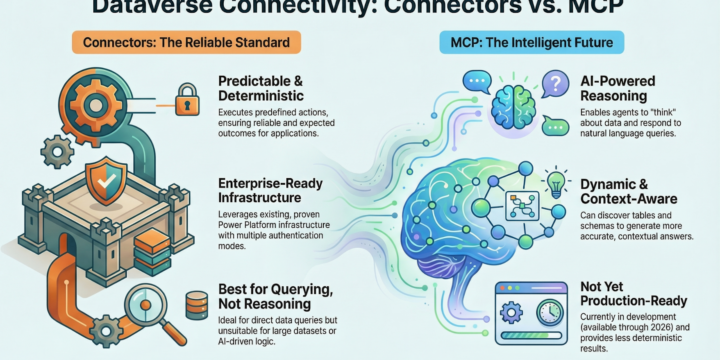
Choosing the right way to connect to Dataverse is essential for building effective business applications and AI agents. While most organizations currently rely on traditional connectors, the Model Context Protocol (MCP) is emerging as the future of intelligent data interaction. Connectors: The Reliable Standard Connectors are built on established best practices and provide enterprise-grade reliability. They are the best choice when you need deterministic behaviors—predictable outcomes where the app performs predefined actions. Strengths Established best practices and enterprise-grade reliability Leverages existing Power Platform connector infrastructure Support multiple authentication modes Weaknesses: Executes predefined actions rather than allowing AI reasoning Not suitable for If queries could contain large datasets (1000+ records)   MCP: The Intelligent Future MCP is designed for when you need your agents to actually "think" about your data rather…
Read More
Modernizing Support: Dynamics 365 Customer Service MCP Server (Preview)

Modernizing Support: Dynamics 365 Customer Service MCP Server (Preview)

AI, Dataverse (CDS), Dynamics 365 CE, MCP Server, PowerPlatform
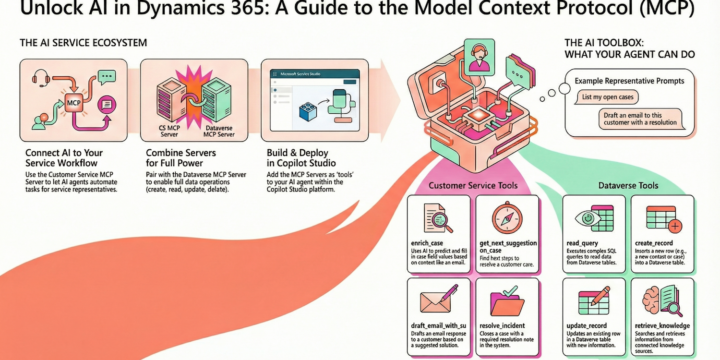
The Dynamics 365 Customer Service Model Context Protocol (MCP) server is a preview feature designed to help developers and representatives automate service workflows and resolve customer issues with higher efficiency. By connecting Dynamics 365 Customer Service to platforms that support the MCP protocol, you can build custom agents that streamline complex, cross-functional business operations. Key Capabilities and Cross-Functional Automation The true power of the MCP server lies in its ability to bridge different business applications. For example, an agent can engage with the Customer Service MCP server and then trigger an order generation through a Dynamics 365 Business Central MCP server. This creates a seamless experience across Sales, ERP, and Service systems. Tools Available in the Preview The server provides specific tools to handle case management and communication: • enrich_case:…
Read More
How to deploy Return to Workplace Facility Dashboard

How to deploy Return to Workplace Facility Dashboard

Dataverse (CDS), Featured, Power BI, PowerPlatform, Return to School, Return to Workplace
How to deploy Return to Workplace Facility Dashboard This is the second part of the deployment process, we are deploying the initial dashboard, other dashboards will follow a similar deployment process, connecting to the Dataverse (CDS) and the external sources. We will only be deploying the Return to Workplace Facility Management Dashboard for this scenario and the other dashboard will follow a similar deployment process, at this time we will simplify documenting only this dashboard. Where to find the Return to the Workplace Facility Dashboard? The Return to Workplace Facility management dashboard can be deployed from Appsource and will automate the deployment process, and the daily refresh schedule, these are the links for all available dashboards. Return to Workplace Facility Manager Dashboard Return to Workplace Workplace Care Management Dashboard Return…
Read More
How to deploy Return to Workplace

How to deploy Return to Workplace

Featured, PowerApps, PowerPlatform, Return to School, Return to Workplace
Return to the Workplace how to deploy apps! Step by Step deployment How to Deploy the Return to Workplace Solution Release 1.3 Apps Return to Workplace Reopen responsibly, monitor intelligently and protect continuously with solutions for a safer work environment. Equip facility managers and task force leaders to make informed decisions to safely reopen locations. Empower employees to return confidently with self-service tools for working safely and productively. Help health and safety leaders ensure the care and well-being of your workforce. In this blog, we will start step by step, creating a commercial trial organization for Power Platform and will review the following steps: Create a commercial trial organization (Microsoft 365) Add the cloud services for licensing PowerApps License (Powerapps per User per Month) Assign the PowerApps license to the…
Read More
Create amazing chatbots using Power Virtual Agent in no time!

Create amazing chatbots using Power Virtual Agent in no time!

Flow, Power Automate, Power Virtual Agent, PowerPlatform
Creating amazing chatbots is so simple and easy with Power Virtual Agent. In this blog post, I will detail the steps on how to create a simple chatbot, in my scenario, I will be creating a chatbot that will tell me my favorite colors and ask for other colors. Initially I was looking for more complexity, however, the team that created the product made sure that you can create this chatbot with low code or no code, I enjoyed creating the chatbot, it was so much fun, I was checking the documentation and the videos that the product team created on how to build your first chatbot, so that was not a big deal. The following is the location for the documentation, Power Virtual Agent Documentation, to create a new…
Read More
Team Development for PowerApps Canvas Apps

Team Development for PowerApps Canvas Apps

PowerApps, PowerPlatform
This is a common question I encounter all the time when talking with customers and also developers, they ask for code-behind, source code and many more similar questions, however, the most common question is how to work in collaboration in a team environment when designing and creating PowerApps Canvas Apps. The initial understanding is that PowerApps Canvas Apps are not really built for different developers to work on them until now we have a way to collaborate using components and branching the main application design, by deconstructing the application in many components we can work on different parts of the application simultaneously and collaborate on the full design. "Components allow to clearly define the input/output and the desired behavior making your app more modular" as mentioned in the following Microsoft…
Read More
PowerApps Canvas using Status Fields in CDS

PowerApps Canvas using Status Fields in CDS

Common Data Services CDS, Dynamics 365 CE, Flow, PowerApps, PowerPlatform
When creating a new Custom Entity and also out of the box core entities, automatically the system in this case CDS will create a series of fields that are used internally and for auditing, and others for user and application use, in this blog I want to give more details on how the Status and Status Reason are used in CDS, and how is been in Dynamics 365 CE for many years earlier.  The Status and Status Reason fields are used to make the records Active or Inactive, giving you the option to mention why the record is active (New, Active, In-progress, draft) or inactive (Cancel, Completed, Sent, ...), when the record is inactive in Dynamics 365 CE, you can NOT make more changes to the record and you will…
Read More
PowerApps Canvas using Lookups with CDS

PowerApps Canvas using Lookups with CDS

Common Data Services CDS, Dynamics 365 CE, Flow, PowerApps, PowerPlatform
The following video is the second part of how to use Canvas apps Lookup fields with CDS (Common Data Service), this video covers how to use the combo box to display lookup fields and using CDS entities or collections to display the data, also how to save the data with PowerApps Patch function and Flow. Previously I presented a blog post and video that show how to use the Dynamics 365 connector with the canvas app and lookups, this videos will provide more details on how to use lookups with CDS (Common Data Service), there are some differences when using the Patch function on the PowerApps application. The application is similar on screen and how the collections and entities are assigned to the Combo box controls, where the differences are…
Read More
Canvas and CDS Relationships

Canvas and CDS Relationships

Common Data Services CDS, Dynamics 365 CE, PowerApps, PowerPlatform
New features on the Common Data Service is the relationships and this blog is part of a video posted on Youtube, we will describe most of the features benefits but I will recommend viewing the video. the original documentation will give more details on how to create the Lookup fields and the relationships, the following link has the details Create a Relationship between entities (more…)
Read More
Canvas Using OptionSets and Lookup Fields

Canvas Using OptionSets and Lookup Fields

Dynamics 365 CE, PowerApps, PowerPlatform
The new options from the CDS and PowerApps canvas applications is to use relationships with 1 to many, or many to 1, however this is natively in the Dynamics 365 CE and now on CDS, but how we use these type of fields; for a technical CRM developer this was using the Code Value for the Optionsets and using the ID Guid for the Lookups, among other parts for the complex object. The new web API help to resolve or make it more interesting the way we use these 2 objects, let me get into the details on CRM before we get into the PowerApps Canvas App. (more…)
Read More